SSO ID Rajasthan Portal Registration
SSO ID Rajasthan Portal Registration is an online process that helps users create a single digital account for Rajasthan government services. After registration, citizens, business owners, and government employees can access many services with one username and password. It removes the need to create separate accounts for different departments and makes online work easier.
Through the Rajasthan SSO portal, users can register using options like Jan Aadhaar, Google, Udhyog details, or government employee information. Once the account is created, users can log in to access e-Mitra, Jan Aadhaar services, recruitment forms, business services, and employee portals. This guide explains the complete registration process in simple and easy wording.
Documents Required for SSO ID Registration
Before creating your SSO ID, keep these documents ready:
- Aadhaar Card
- Jan Aadhaar Card
- Mobile Number
- Email Address
- SIPF ID (for government employees)
- BRN or GSTIN (for businesses)
How to Register on SSO Rajasthan Portal
Users can register on the SSO Rajasthan portal online by selecting the correct user category and completing the verification process.
Visit the Official Portal
Open the official SSO Rajasthan website on your mobile or desktop browser. Make sure you are using the correct portal before entering any personal details.
Click on Registration
On the homepage, click the Registration option to start creating a new account. This option is for users who do not already have an SSO account.
Select User Category
Choose your category from Citizen, Udhyog, or Government Employee. Select the right option because each category has a different registration method.
Choose Verification Method
Select a verification method such as Jan Aadhaar, Google, or employee details. Business users may need industry or business-related information.
Fill Required Details
Enter your personal, business, or employee details carefully in the registration form. Make sure your mobile number and email are correct.
Verify OTP
Enter the OTP received on your registered mobile number or email ID. This step helps confirm your identity and secure your account.
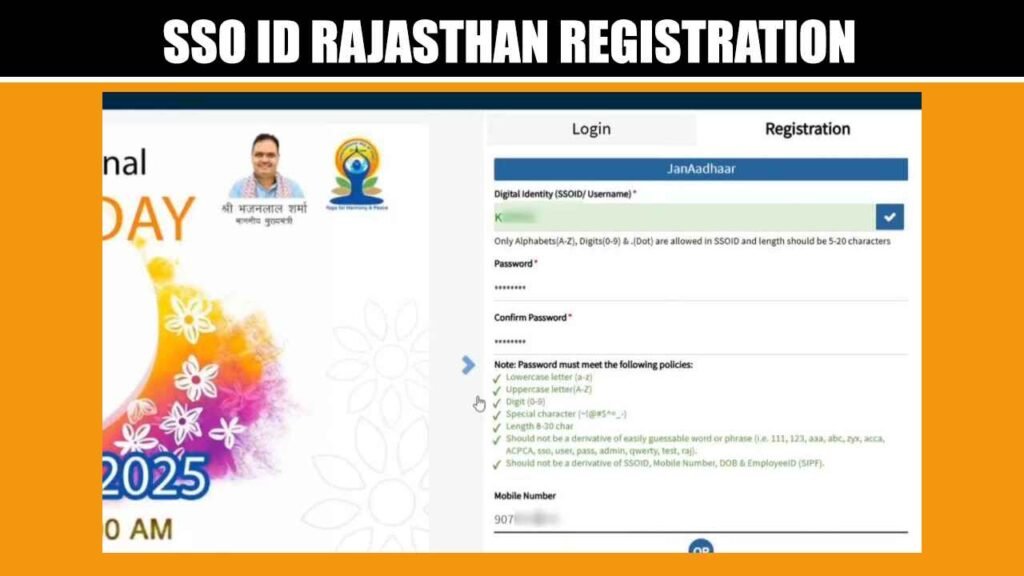
Create Login Details
Set your SSO username and a strong password for future login. After successful registration, you can use these details to access Rajasthan government services.
SSO ID Registration Using Jan Aadhaar
Jan Aadhaar is a useful option for Rajasthan residents because it helps verify citizen details easily. Users should keep their Jan Aadhaar number and linked mobile number ready before starting registration.
- Choose Citizen/Udhyog: Select the citizen registration category from the registration page.
- Select Jan Aadhaar: Click on the Jan Aadhaar option for identity verification.
- Enter Details: Add Jan Aadhaar number and required family member information.
- Verify OTP: Complete OTP verification through the registered mobile number.
- Create Account: Set login details and complete your SSO registration.
SSO ID Registration Using Google
Google registration is useful for users who want a quick signup option. The official registration page currently shows Google as an option under Citizen/Udhyog registration.
- Choose Google Option: Select Google from the available registration methods.
- Sign in Account: Use the Google account you want to connect.
- Allow Verification: Complete account permission or verification steps.
- Fill Details: Add required profile information if asked.
- Complete Signup: Create or confirm login details to finish registration.
SSO ID Registration for Business and Industry Users
Business owners and industry users can register through the Citizen/Udhyog category. This account helps them access business-related services, licenses, approvals, and official applications from one place.
- Select Udhyog Category: Choose Citizen/Udhyog to begin business-related registration.
- Enter Business Details: Provide required business or industry information correctly.
- Verify Mobile Number: Complete OTP verification using the registered contact number.
- Create Login Details: Set your username and strong password for future access.
- Use Business Services: Access licenses, approvals, and other industry services after login.
SSO ID Registration for Government Employees
Government employees can use the Govt. Employee option on the registration page. This category is designed for Rajasthan government employees who need access to employee-related services and official applications.
- Choose Govt. Employee: Select the government employee category from registration options.
- Enter Official Details: Add required employee information for account verification.
- Verify Records: Complete the verification process as shown on the portal.
- Create Credentials: Set a secure username and password for login.
- Access Services: Use employee-related applications after successful registration.
How to Login After Registration
After completing registration, users can log in from the Rajasthan SSO login page. The login page asks for Digital Identity (SSOID/Username), password, and a 6-digit captcha code.
- Open Login Page: Visit the Rajasthan SSO login section.
- Enter SSOID: Type your registered username or digital identity.
- Add Password: Enter the password created during registration.
- Fill Captcha: Enter the 6-digit captcha code shown on the page.
- Click Login: Open your dashboard and access available services.
Benefits of SSO ID Rajasthan Registration
SSO ID Rajasthan Registration helps users access many government services with one digital account. After registration, citizens can use services like e-Mitra, Jan Aadhaar, recruitment forms, certificates, and welfare schemes from one place. It saves time because users do not need to create separate accounts for different departments.
The registration is also useful for business owners and government employees. Business users can access licenses, approvals, and industry services, while employees can use official portals and work-related applications. Overall, it makes online government services easier, faster, and more organized.
Common Registration Problems and Solutions
Many users face small registration issues on the SSO Rajasthan portal, but most problems can be solved quickly with simple steps.
| OTP not received | Retry after checking your network |
| Aadhaar verification failed | Enter correct Aadhaar details |
| Website not opening | Refresh page or change browser |
| Invalid mobile number | Use active registered number |
| Username already taken | Choose another username |
| Captcha not working | Refresh captcha and try again |
| Password error | Use strong password format |
| Form not submitting | Fill all required fields correctly |
Frequently Asked Questions (FAQs)
Who can register on the Rajasthan SSO portal?
Citizens, business owners, industry users, and Rajasthan government employees can register on the portal. Each user needs to select the correct category during registration to complete the process properly.
Which documents are required for registration?
Users may need Jan Aadhaar, Aadhaar card, mobile number, email ID, Google account, BRN details, or employee information. The required details depend on the selected user category.
Can I register using Jan Aadhaar?
Yes, Rajasthan residents can register using Jan Aadhaar details. This option is useful for citizens because it helps verify personal and family-related information quickly during account creation.
Is mobile number required for SSO registration?
Yes, an active mobile number is important for OTP verification, account security, and future recovery. Users should enter a working number that they can access anytime.
What should I do after registration?
After successful registration, users can visit the login page and enter their SSO ID, password, and captcha. Once logged in, they can access available government services from the dashboard.
Final Thoughts
Creating an account on the Rajasthan SSO portal is helpful for anyone who wants quick access to online government services. It brings citizen, business, and employee services together under one login system. Users should choose the correct registration option and enter all details carefully. Once registered, the account can be used anytime for forms, schemes, updates, and service access.