SSO ID Rajasthan Portal Login
SSO ID Rajasthan Portal Login is an online process that allows users to access many Rajasthan government services from one place. With one username and password, citizens, business owners, and government employees can log in and use different services easily. It saves time because users do not need separate accounts for every department.
Through the Rajasthan SSO portal, users can access e-Mitra, Jan Aadhaar services, recruitment forms, business services, and employee-related applications. The login process is simple, but users must enter the correct SSO ID, password, and captcha. This guide explains the complete login process in easy and clear wording.
SSO ID Rajasthan Portal Login Requirements
Before logging in to the Rajasthan SSO portal, users should keep some basic details ready. These details help complete the login process without errors.
- SSO ID / Username: Required to identify your registered account on the portal.
- Password: Needed to securely access your Rajasthan SSO dashboard.
- Captcha Code: A 6-digit captcha code must be entered correctly during login.
- Active Internet: A stable internet connection helps avoid loading and session errors.
- Updated Browser: Use Chrome, Firefox, Edge, or another modern browser for smooth access.
- Registered Mobile Number: Needed if OTP verification or password recovery is required.
How to Login to SSO ID Rajasthan Portal
Logging in to the SSO ID Rajasthan portal is easy if you already have a valid account. Follow the steps below to access your dashboard.
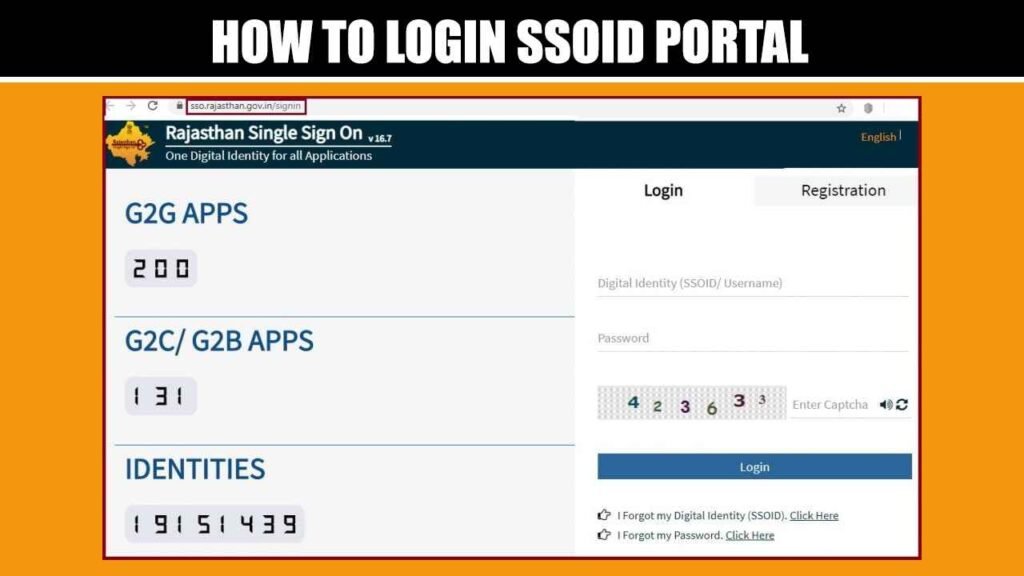
Visit the Official Login Page
Open the official Rajasthan SSO () login page in your mobile or desktop browser. Make sure you are using the correct government portal before entering your login details.
Enter Digital Identity
Type your Digital Identity, SSOID, or username in the login field. Enter the details carefully because even a small spelling mistake can stop the login process.
Add Password
Enter your account password in the password field. Make sure Caps Lock is off and there are no extra spaces before or after the password.
Fill Captcha Code
Enter the 6-digit captcha code shown on the screen. If the captcha is unclear, refresh it and type the new code correctly.
Click Login Button
After entering all details, click on the login button. If your details are correct, the portal will open your SSO dashboard.
Access Services
Once logged in, choose the service you want to use from the dashboard. You can access e-Mitra, Jan Aadhaar, recruitment forms, business services, and other available applications.
Login for Citizen Users
Citizen users can log in to the Rajasthan SSO portal using their registered SSOID and password. This login helps citizens access many online services without visiting government offices again and again.
Citizens can use the dashboard for scheme applications, certificates, e-Mitra services, Jan Aadhaar-related work, recruitment forms, and public welfare services. The portal makes it easier to manage different services from one place.
Login for Business and Udhyog Users
Business owners and industry users can also log in through the same SSO Rajasthan portal. They need to use the SSO account created under the Citizen/Udhyog category.
After login, business users can access services related to registration, licenses, approvals, GST-related services, and other industry applications. This helps business users complete important government work online.
Login for Government Employees
Rajasthan government employees can use their SSO login to access employee-related services and official applications. During registration, government employees usually use their official details under the Govt. Employee option.
The registration page shows separate options for Citizen/Udhyog and Govt. Employee users, with Jan Aadhaar and Google visible under Citizen/Udhyog registration.
Common SSO ID Login Errors and Fixes
| Wrong SSOID or Password | Recheck your username and password before trying again. |
| Captcha Not Accepted | Refresh the captcha and enter the new code carefully. |
| Forgot Password | Use the forgot password option and verify through mobile or email. |
| Forgot SSOID | Use the forgot Digital Identity option from the login page. |
| OTP Not Received | Check mobile network and confirm your registered number is active. |
| Account Locked | Wait for some time before trying again or contact support. |
| Page Not Loading | Clear browser cache or open the portal in another browser. |
| JavaScript Error | Enable JavaScript because the SSO portal uses scripting. |
Frequently Asked Questions (FAQs)
What details are required for SSO login?
Users need their SSOID or username, password, captcha code, and sometimes OTP verification to access the Rajasthan SSO dashboard securely.
Can I login without Jan Aadhaar?
Yes, Jan Aadhaar is mainly used for registration and verification. Existing users can log in with their registered SSOID and password.
What should I do if I forgot my SSOID?
Use the forgot Digital Identity option on the login page. You can recover it using your earlier registration method or registered mobile number.
How can I reset my SSO password?
Click the forgot password option, enter your Digital Identity or registered email, choose mobile or email verification, and follow the reset process.
Why is my captcha not working?
Captcha errors usually happen because of wrong entry, expired code, or browser issue. Refresh the captcha and type the new code correctly.
Final Thoughts
SSO ID Rajasthan Portal Login makes it easy to access many government services from one place. Users can log in with one username and password to use e-Mitra, Jan Aadhaar, recruitment, and other services. The process is simple if the correct SSO ID, password, and captcha are entered carefully. Always use the official portal and keep your login details safe for secure access.