Recover Forgotten SSO ID Rajasthan
Forgetting your SSO ID Rajasthan can be stressful, especially when you need to access e-Mitra, recruitment forms, Jan Aadhaar services, or other government portals. Many users create their account once and later forget their login identity because they do not use it regularly. The good thing is that the Rajasthan SSO portal provides simple recovery options to find your forgotten SSO ID online.
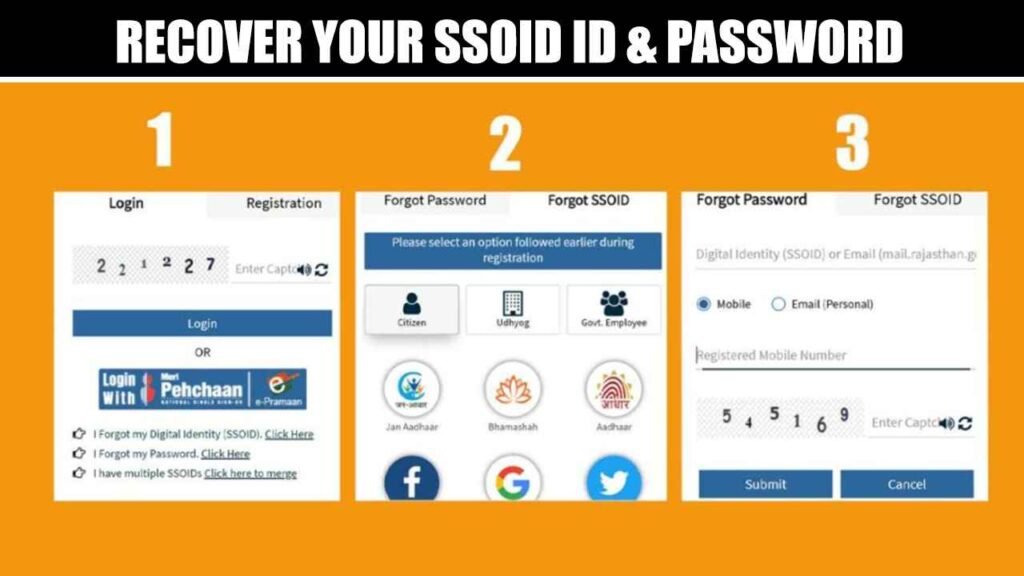
Users can recover their SSO ID by using the same method they selected during registration, such as Jan Aadhaar, Aadhaar, Google, Udhyog, or government employee details. The process is quick if your registered mobile number or email is active for verification. This guide explains how to recover forgotten SSO ID Rajasthan step by step in simple wording.
Common Reasons for Forgetting SSO ID
Users may forget their SSO ID for different simple reasons, especially when they do not use the Rajasthan SSO portal regularly.
- Long Gap in Usage: Many users create an account once and do not log in for months.
- Multiple Login Accounts: Some users manage many online accounts and forget which ID was used.
- No Saved Details: Users may forget their SSO ID if they did not save it safely.
- Different Registration Method: Confusion happens when users forget whether they used Jan Aadhaar, Google, or Aadhaar.
- Changed Mobile Number: Recovery becomes difficult when the registered mobile number is no longer active.
- Old Email Account: Some users lose access because their registered email is outdated or unused.
- One-Time Use: Many people create SSO ID only for recruitment forms or e-Mitra work.
Methods to Recover Forgotten SSO ID
Users can recover their forgotten SSO ID through different options available on the Rajasthan SSO portal.
Choose the method that matches the details used during your original registration.
Recover SSO ID Through Mobile Number
Users can recover their SSO ID through mobile number if their registered number is active and available for verification.
- Open Login Page: Visit the Rajasthan SSO login page on your browser.
- Click Forgot Option: Select the forgot SSO ID option from the login screen.
- Choose Mobile Method: Select mobile number if this recovery option is available.
- Enter Mobile Number: Type the registered mobile number linked with your account.
- Verify OTP: Enter the OTP received on your mobile for confirmation.
- Get SSO ID: Your SSO ID will be displayed or sent after verification.
Find SSO ID Using Registered Email
Users can also find their SSO ID through the email address linked with their Rajasthan SSO account.
- Visit Recovery Page: Open the forgot SSO ID page from the official portal.
- Select Email Option: Choose email recovery if this option appears on the page.
- Enter Email ID: Add the email address used during account registration.
- Check Inbox: Look for OTP or recovery details in your email inbox.
- Complete Verification: Enter the required code or follow the recovery instructions.
- Save Details: Note your recovered SSO ID safely for future login.
Recover SSO ID With Jan Aadhaar Details
Rajasthan residents can recover their SSO ID using Jan Aadhaar details if they registered through Jan Aadhaar.
- Choose Citizen Option: Select Citizen category on the forgot SSO ID page.
- Select Jan Aadhaar: Choose Jan Aadhaar as your recovery method.
- Enter Jan Aadhaar Number: Add your Jan Aadhaar number carefully in the form.
- Select Member: Choose the correct family member linked with the account.
- Verify OTP: Enter the OTP received on the registered mobile number.
- Recover Account: After verification, your SSO ID details will be shown or sent.
Recover SSO ID for Government Employees
Rajasthan government employees can recover their SSOID by choosing the Government Employee category. This option is useful for employees who registered using official employee details.
Employees may need SIPF-related information or official details used during registration. The recovery process works best when the user selects the same method used at the time of account creation.
Employee Recovery Steps
- Select Govt. Employee: Choose the employee option on the recovery page.
- Enter Official Details: Provide the required employee information correctly.
- Verify Identity: Complete mobile, email, or official record verification.
- Recover Account: Get your SSOID after successful verification.
How to Reset Password After Recovering SSOID
After recovering your SSOID, you can reset your password from the Rajasthan SSO login page.
Make sure your registered mobile number or email is active for OTP verification.
- Open Login Page: Visit the Rajasthan SSO portal and go to the login section.
- Click Forgot Password: Select the forgot password option below the login form.
- Enter SSOID: Type your recovered SSOID or registered digital identity carefully.
- Fill Captcha Code: Enter the captcha shown on the screen for security verification.
- Choose Verification Method: Select mobile number or email option for password recovery.
- Verify OTP: Enter the OTP received on your registered mobile number or email.
- Create New Password: Set a strong new password for your Rajasthan SSO account.
- Login Again: Use your SSOID and new password to access the portal.
Tips to Avoid Forgeting SSOID Again
After recovering your SSOID, save it in a safe place where you can easily find it later. You can note it in a secure diary, password manager, or private digital note. Avoid sharing your login details with anyone because your account may be linked with important government services.
Always keep your registered mobile number and email ID updated on the Rajasthan SSO portal. This helps you receive OTPs and recovery messages whenever needed. You should also log in once in a while to make sure your account stays active and your details remain correct.
Final Thoughts
Recovering a forgotten SSOID is simple if you use the correct recovery method and have your registered mobile number or email ready. The Rajasthan SSO portal gives users different options to find their lost login details. Once you recover your SSOID, save it safely to avoid the same problem again.